Using AI to Create a Negotiator KPI Dashboard
An AI-integrated workflow shortened the cycle of ideation → deployment to a mere two weeks. Now, it’s used every day by the Director of Negotiations to track negotiator progress, flag coaching needs early, and catch risks before they escalate.
The Problem: Too Much Noise
Negotiation Genius helps negotiators run supplier negotiations at scale. Leadership needed one place to see how each negotiator was performing — where deals were stalling, which opportunities were slipping, and who needed coaching. What they had was a dense scorecard exported from a script: every negotiator, phase, and violation dumped into flat tables. The information was all there, but there was no clear direction on what to focus on.
Answering a simple question like “who needs to follow up in the Email Sent phase?” meant scanning long tables and doing mental math. I used Claude to quickly turn a static report into a tool that points you in the right direction.
Building a Component System
The first move was structural. I asked Claude to build the scorecard with a proper component system — reusable stat cards, tabs, rows, and status pills — so the interface could stay consistent and we would have a foundation to build upon in the future. A clear hierarchy (headline KPIs up top, detail below) gave leaders an at-a-glance read before drilling in.
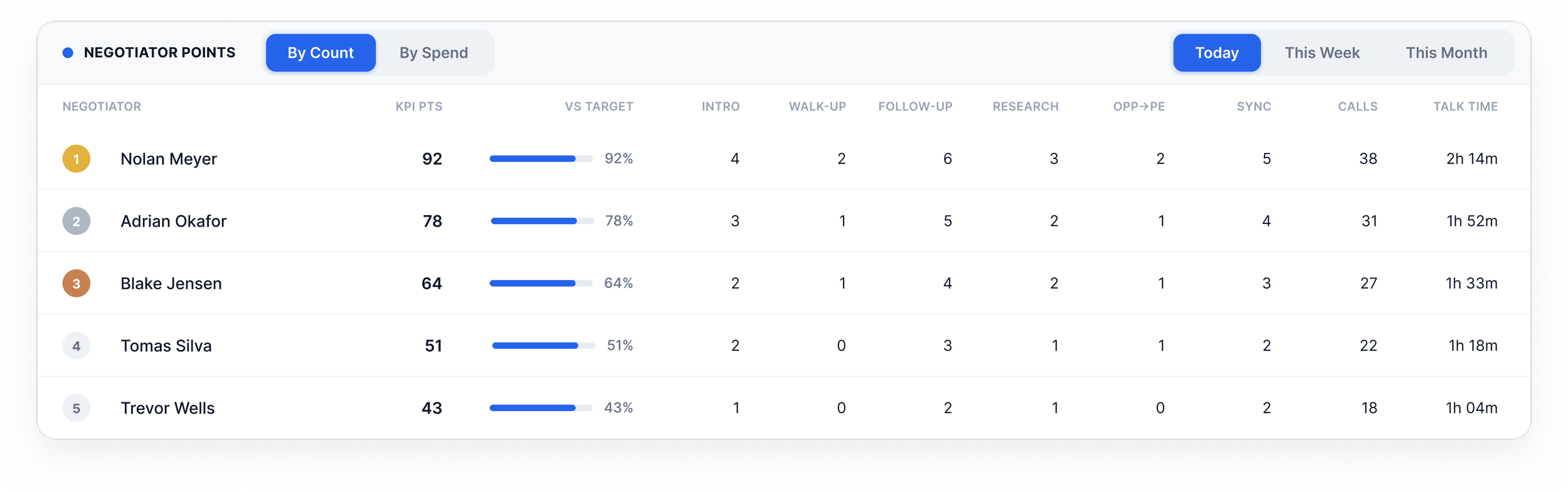
A table showing the number of points for each negotiator
Using Phase-Aware Violations to Focus Coaching
The KPI Violations section is where coaching decisions get made. Violations get flagged after a certain number days of inactivity on the negotiator’s part. Since each negotiator was responsible for dozens of suppliers, I asked Claude to make each negotiator row expandable to reveal the exact suppliers behind their numbers. Small prototype interactions like this used to take hours of fiddling with Figma, but Claude helps speed up the manual work. As a result, I was able to put the prototype in front of stakeholders after just two days.
During the first round of feedback review, our Director of Negotiations asked to be able to filter by phase—this would help concentrate on the highest priority issues first (e.g. Rate Willing opportunities, where suppliers had indicated a willingness to negotiate vs Intro Scheduled, where a first-touch intro had been scheduled but we had no idea if the supplier was open to a negotiation or not). I asked Claude to update the prototype so that clicking a bucket filters the whole section to that phase and recalculates every negotiator’s critical/warning counts to match. A hover cue signals the buckets are clickable, and clicking the active bucket again clears the filter.
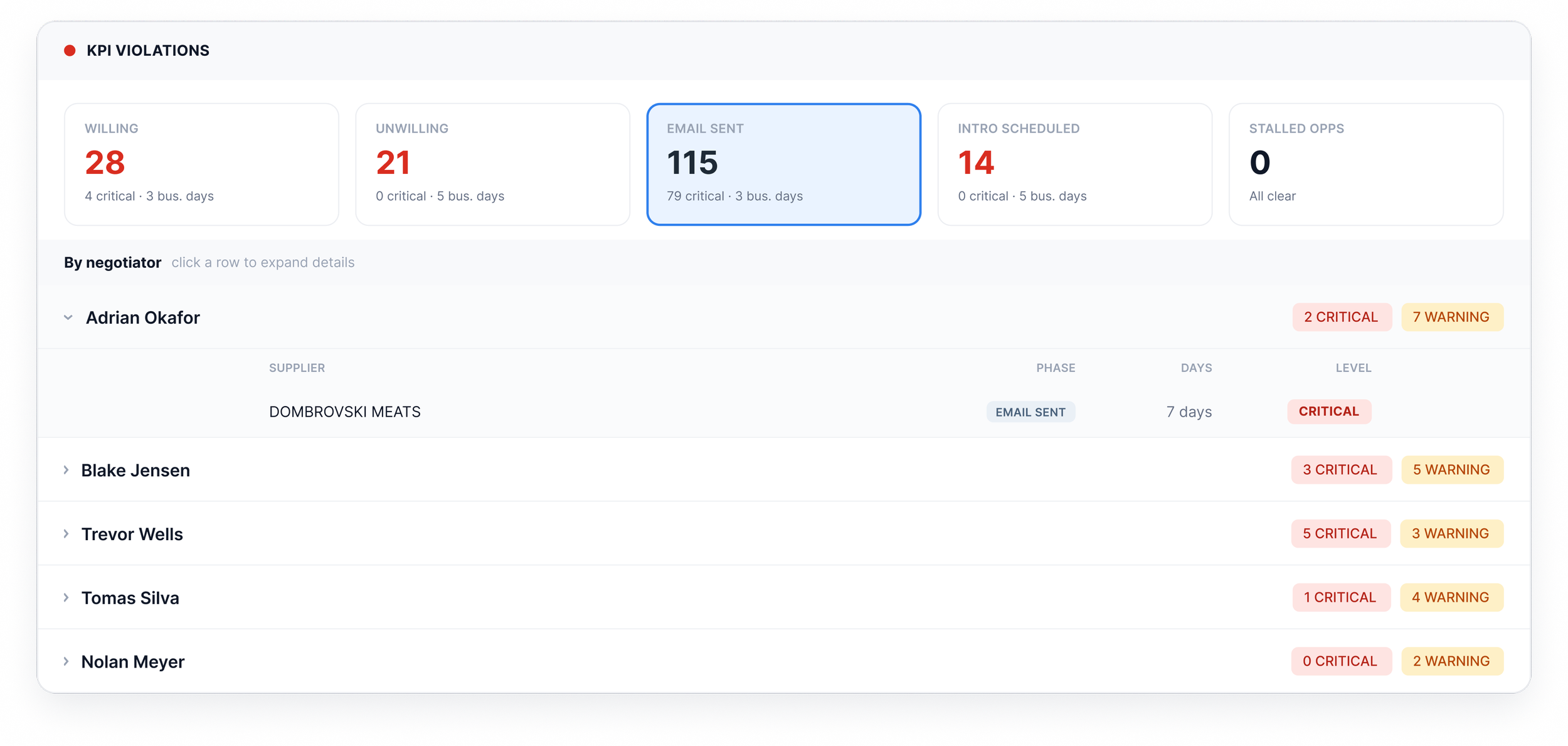
Showing which negotiators were behind on their outreach, mitigating risk before it happens
Customizing the Parameters
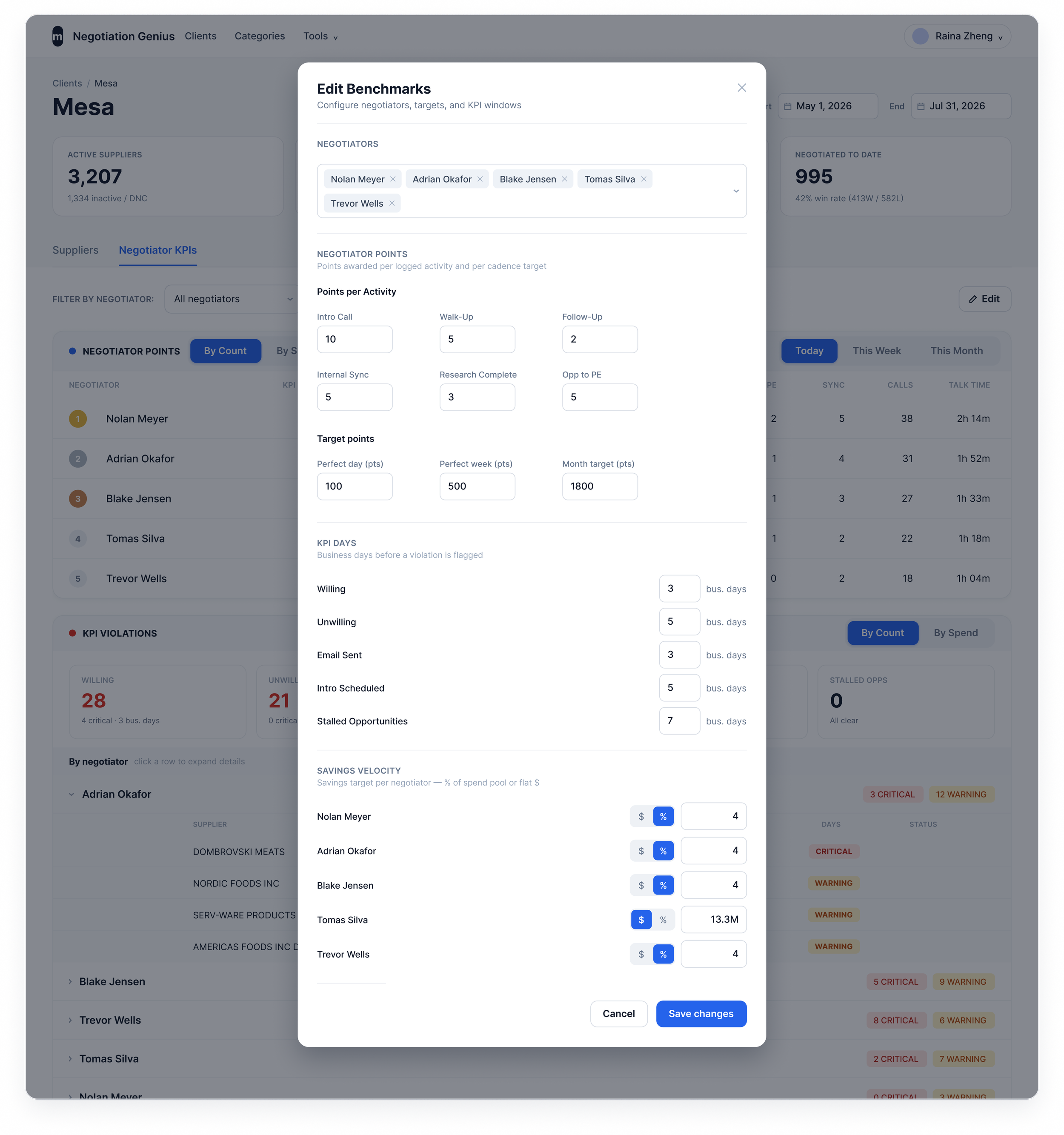
One final piece to add was the ability to customize the benchmarks for each client and negotiator. Since each client could be vastly different based on the size, industry, and types of suppliers, we needed a way to set the parameters for each project to be able to measure negotiator performance accurately. The Edit Benchmarks modal hands that control to leadership — activity points per touchpoint, per-negotiator targets, KPI-day thresholds, and savings velocity — so the board reflects each team’s real, meaningful expectations instead of hard-coded defaults.
Impact
With Claude, I was able to create the clickable prototype in just two days, take another to update it with stakeholder feedback, and hand it off to engineering, who was able to stand it up in a week and a half. We were able to deliver the full product within two weeks, which was hotly anticipated by leadership.
Now, what was a static export is a daily habit. The dashboard is used every day by the Director of Negotiations to track negotiator progress, identify who needs coaching, and catch risks before they turn into escalations. Leadership is able to spend their focus on actually coaching, rather than trying to sift through massive amounts of data.
What’s Next
There are a number of improvements to make after deploying the V0. Chief among them:
Creating a daily email digest for leadership so they can receive the report straight to their inbox, with a weekly and monthly wrap-up
Trend lines that show whether coaching is actually moving the numbers over time
Using AI to flagging specific patterns for each negotiator to create tailored coaching plans