Low-Touch Audits
A project that aimed to solve inefficiencies across multiple departments and modernize our core product was originally thought to be backend-only. Once I was brought on, I worked with engineers, analysts, and CX managers to craft a new workflow that merged three separate software platforms and automated a ton of manual work.
Ultimately, this effort resulted in 96% time savings for our analysts and allowed our clients to go from 1-2 audits per year to 4-12 audits per year, helping them to get their money back faster.
The Problem
STAT’s core product is a historical audit that looks back on the past two years of a supplier’s transactions with a big retailer and evaluates where they’re owed money from the retailer. Client Experience Managers (CXMs) would add new audits in our homegrown Admin platform, which would then flow into a queue for our Analytics team to perform the actual audit by starting a workflow in Knime (a data and reporting platform), and the results would then be returned to CXMs to communicate back to our clients.
Every step of the process was rife with unnecessary manual work, like uploading and downloading files into various folders, having to ping coworkers to apprise them of the audit status, etc. The goal was to automate a lot of the intermediate steps, reducing the possibility for human error and speeding up the whole process.
Because this was largely seen as a backend efficiency project that didn’t affect the frontend, Design was originally excluded from the kickoff and planning stages. However, the team consulted me when they realized they’d need a place in Admin for analysts to approve or deny the output from the Knime workflow: “We just need to add a button somewhere.” Famous last words!
Mapping the Workflows
I could’ve just fulfilled the request and plopped a button on our Admin page, but it seemed irresponsible to do without understanding the larger context. I added myself to the recurring weekly syncs for the project, and started mapping what each role did within the audit process. Once we had a clear idea of the present-day workflow and all the actors involved, we started updating the workflow to show which pieces could be automated.
It took multiple weeks of discussions with developers, analysts, and CX managers to document all the requirements and integrations necessary to make the new process work.
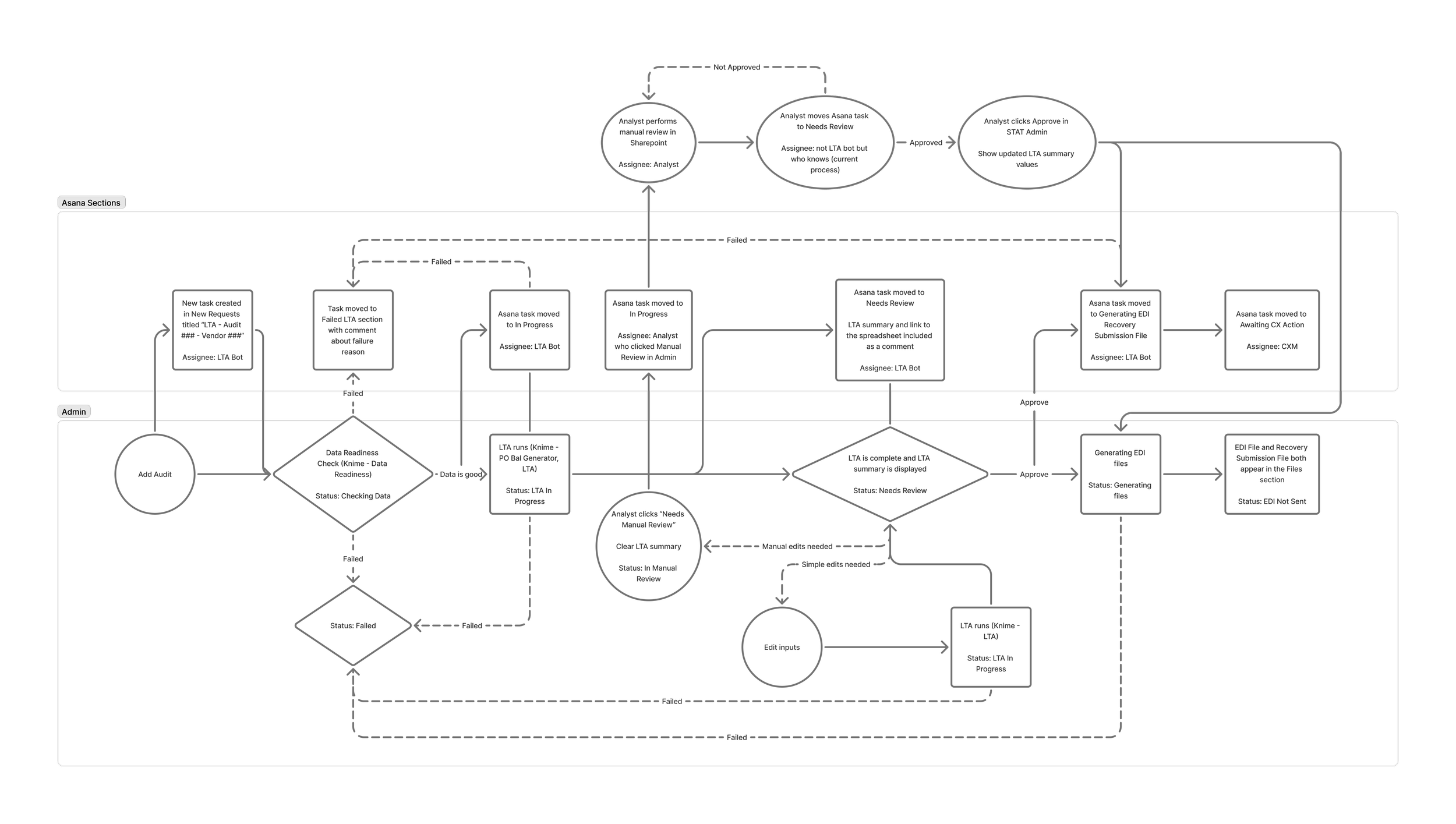
First workflow draft
Design
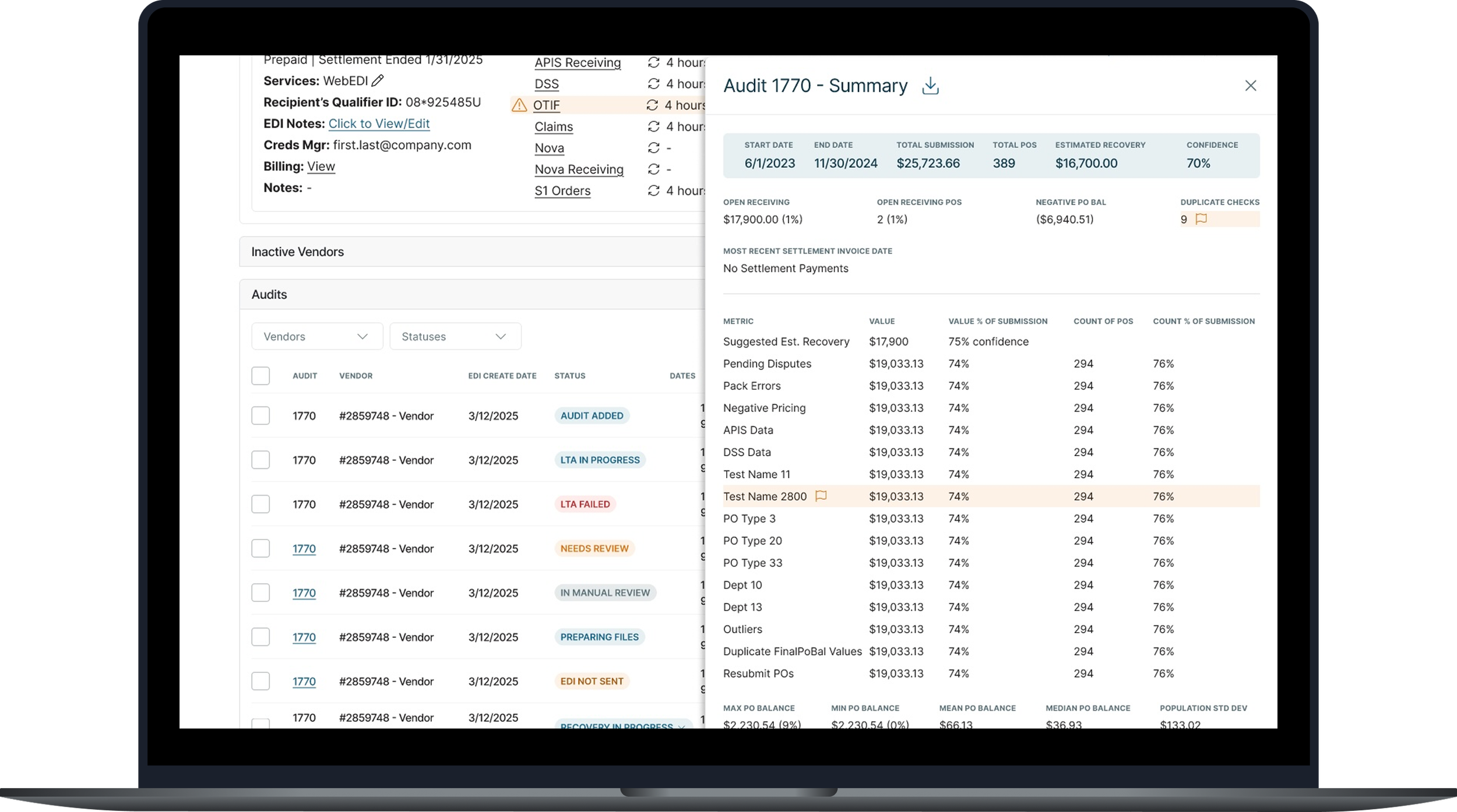
Once all stakeholders were in agreement on the first draft of the workflow, I started designing all the visible touchpoints while engineering got started on automating the backend steps. Because the aim of this project was to improve efficiency to internal processes, my designs focused on practicality and what would be quickest for engineers to implement. Wherever possible, I used components that already existed in our Admin platform, even if they weren’t the most aesthetically pleasing. If there was a need for something new, like the drawer that slid out from the right side to show the detailed output of the Knime workflow, I took it from our Client Portal platform so it would be easy to copy.
The project team met regularly to keep each other apprised of our progress and to discuss any surprises that popped up. For example, when the developers were trying to configure an Asana integration, it turns out the endpoints were different than expected. We discussed a solution and updated the FigJam workflow to keep it up-to-date as the source of truth.
First workflow draft
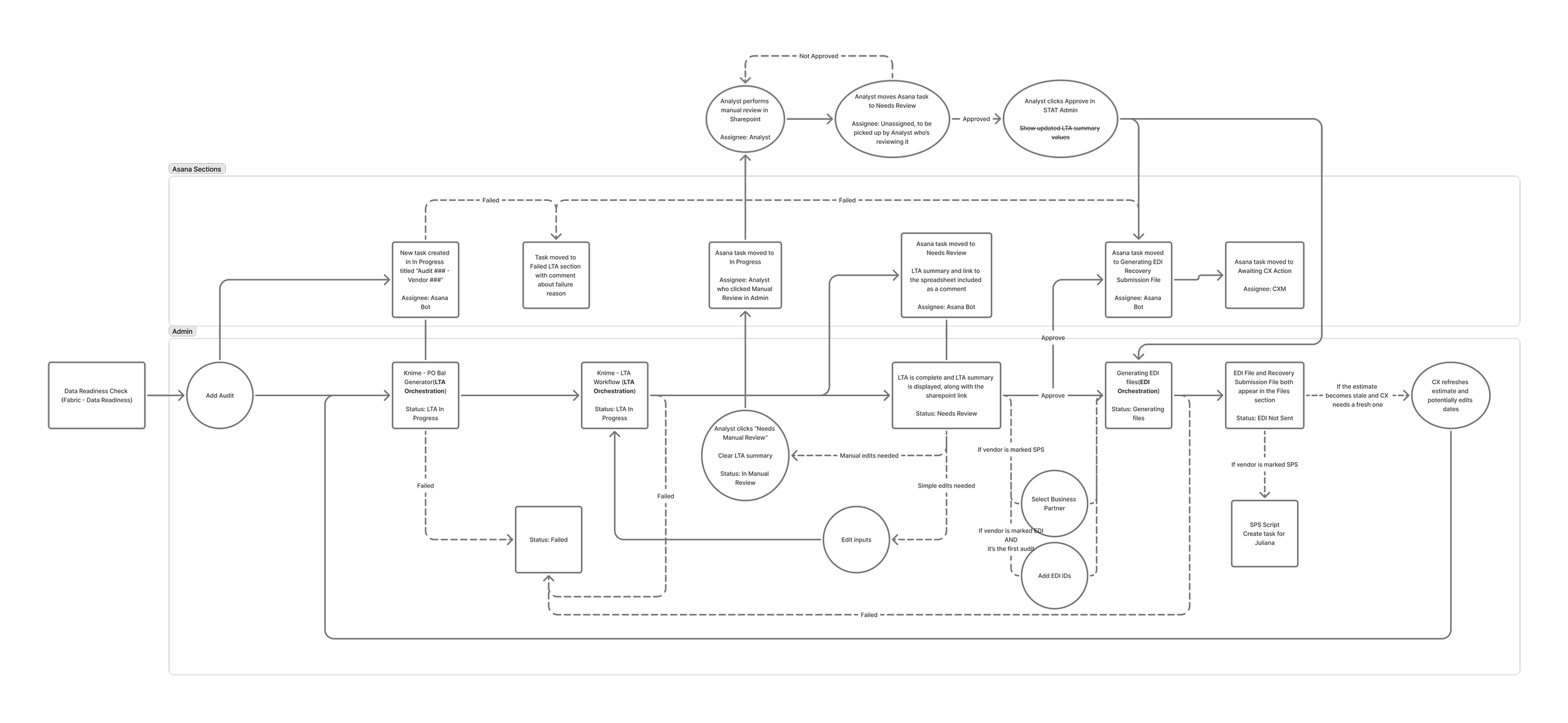
Second workflow draft
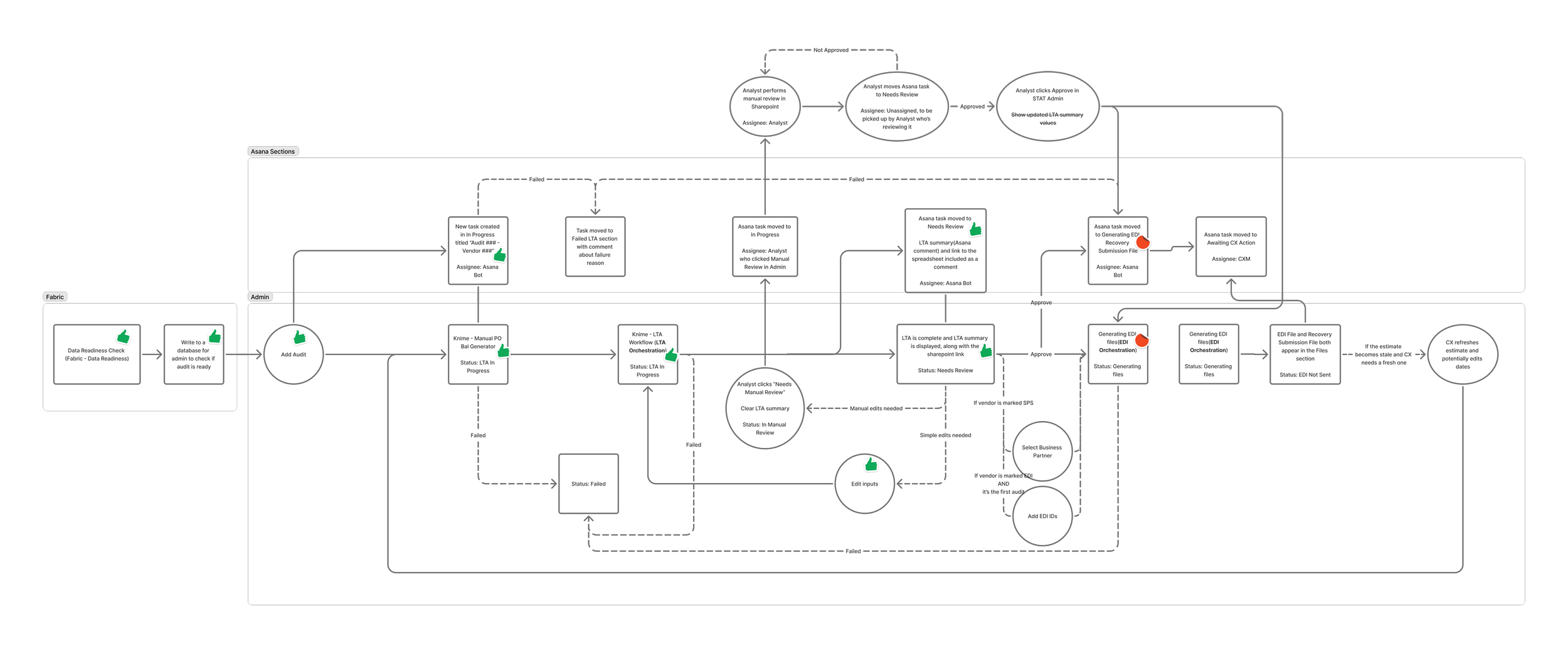
Finalized workflow
As the designs progressed, we would show iterative versions to stakeholders regularly. Often, they would mention an edge case or ask for an adjustment; because we were consistently communicating and designing iteratively, nothing ever felt like an insurmountable roadblock.
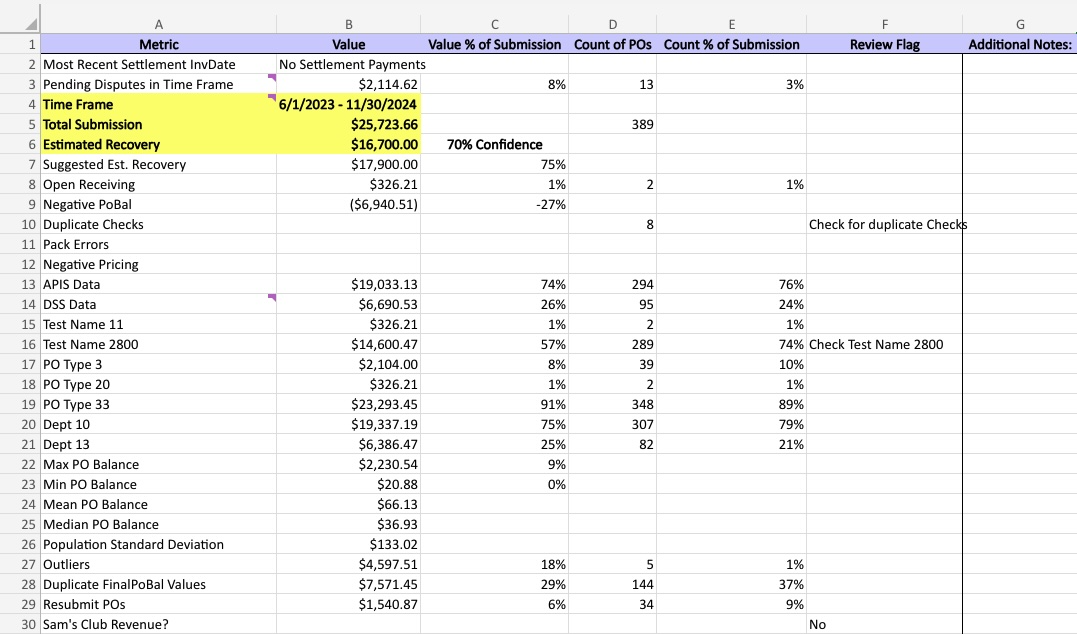
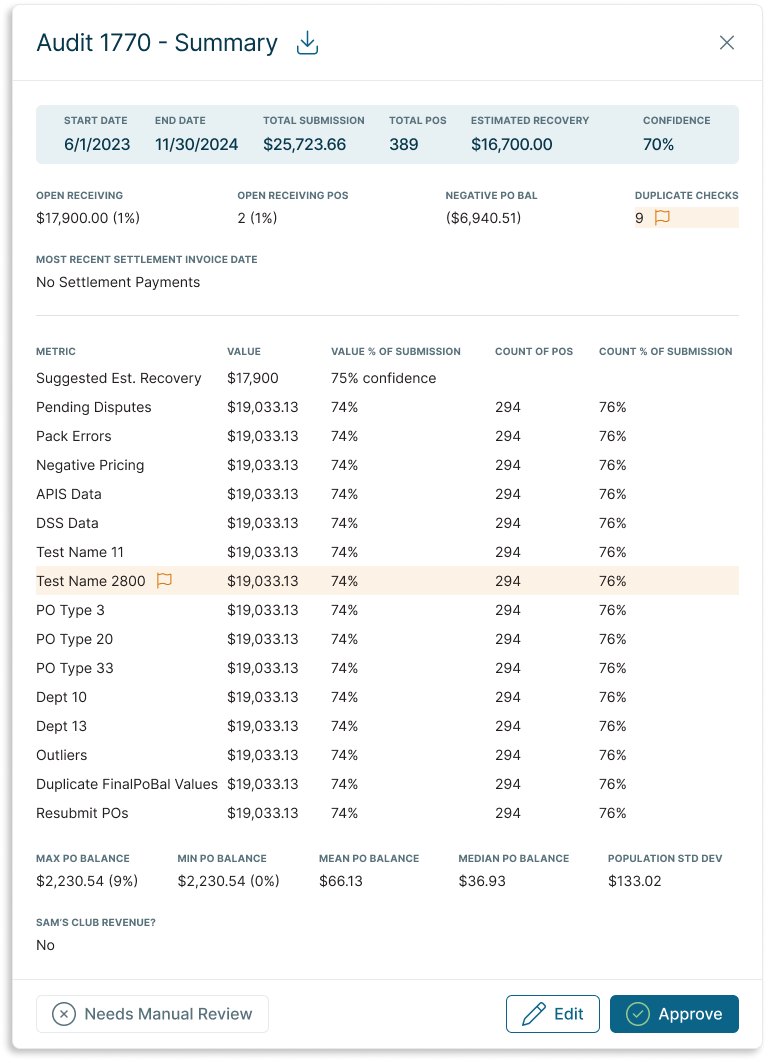
Left: Excel output of the Low-Touch Audit Knime workflow
Right: The same information conveyed in an easy-to-read drawer to be shown in our Admin platform
Final Deliverable
The final deliverable automated 80% of the previous manual workflow. Once a new audit request was entered into the system, an automated worker would feed the audit parameters into the Knime workflow, grab the results, and display them in the Admin platform while simultaneously updating task statuses in Asana, where CXMs would have more visibility. Analysts could view the results and either Approve the audit, Edit the audit parameters, or in rare edge cases with abnormal results, kick it out of the automated workflow for Manual Review.
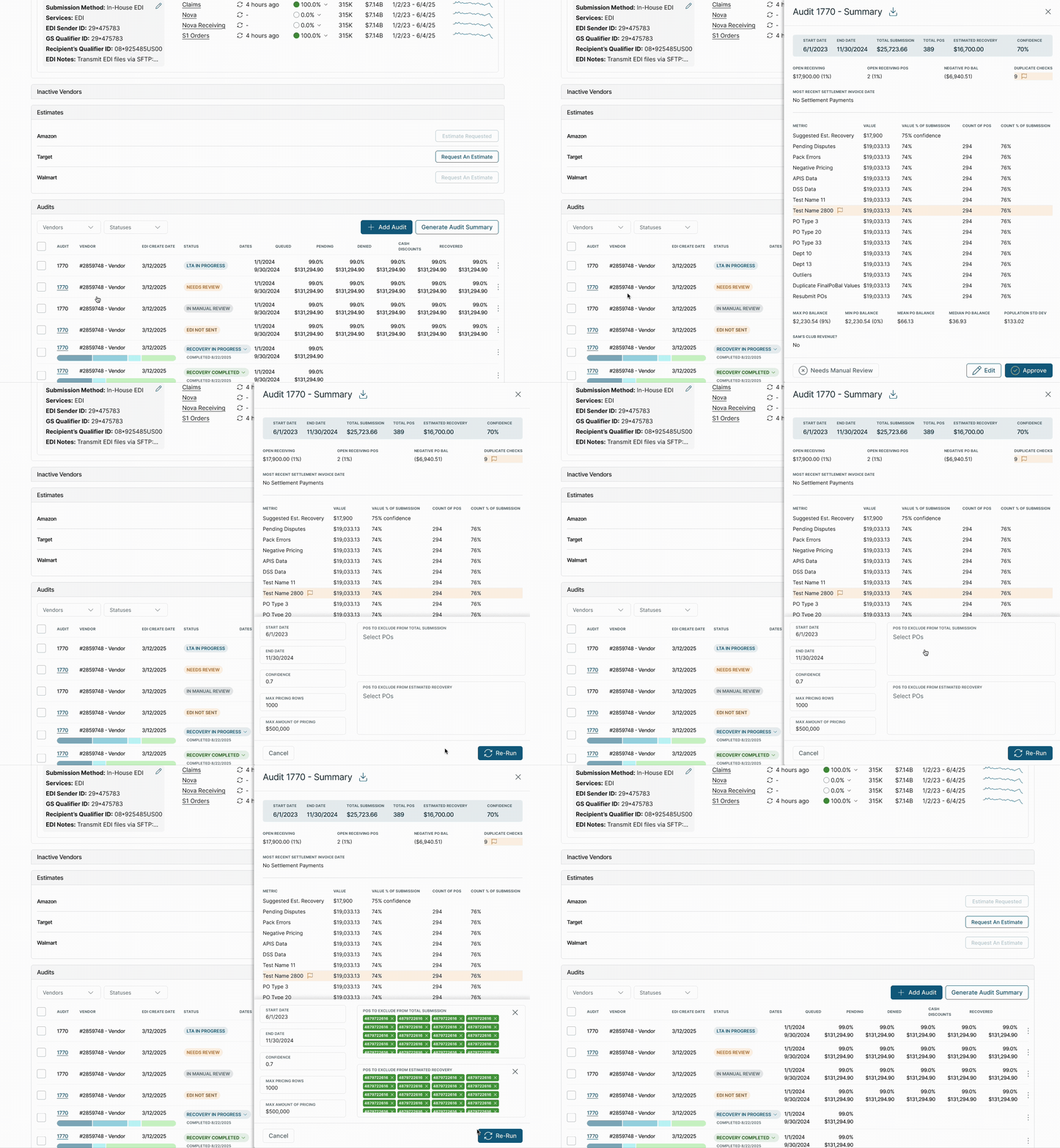
Once the analyst Approved the audit, the files (a Recovery Submission File and an EDI file) that CX managers send to the client for their approval were automatically generated. Previously, analysts would have to laboriously enter the audit results into a form to generate the necessary files. These files would then be automatically uploaded into the Client’s page, which would make them accessible to both the client and their CXM—another step that previously relied on the CXM to download the file from the Analytics folder and then re-upload them into the Client’s page.
Testing and Launch
With a typical new feature, our Product team would do QA in a test environment to make sure the feature did what it was supposed to, wouldn’t break if a user strayed from the happy path, and didn’t negatively impact any existing features. However, because of the complicated nature of this project and all the integrations, isolating all the new pieces in a single QA environment proved impossible.
We tested each part individually first, and once we felt good about the individual portions, we reached out to the CX and Analytics teams to coordinate a release schedule. To minimize risk, we asked CXMs to refrain from adding new audits during the deployment, and afterwards we would test audits one at a time until we could be confident the new process worked from end to end. The initial estimate was that the entire process would take half a day.
There were unexpected hiccups with the deployment from the start. While the engineers worked to find the issue on the backend, I coordinated with the team to provide regular updates to our heads of department. Once the code was deployed, I pulled in the analyst who had been our point of contact for the entire project and we tested with a single audit. Unfortunately, the process failed at the file generation stage, but I kept a Zoom call open all day so the dev and analytics could pop in and out as needed to provide updates. We worked through a couple other bugs, and after a couple days, we were able to verify that the entire workflow was functioning as expected.
While the whole deployment and testing process took a lot longer than anticipated, regular updates and clear communication prevented any uncertainty and frustrations from bubbling over.
Results & Takeaways
The overall process wasn’t perfect; we had to de-prioritize a different project to make capacity for this one, since we originally hadn’t accounted for it on our roadmap. Going forward, I asked to join roadmap planning meetings to give UX input and rough estimates on upcoming product initiatives. This should prevent unexpected, last-minute changes in our project prioritization.
The rollout was also somewhat painful, since nobody could add new audits until we had tested and verified each step of the process, which took longer than expected. We discussed solutions with our lead architect to implement better testing methodologies for future initiatives.
Despite these challenges, the project resulted in massive time savings and created a lot of value for the business.
The amount of analyst time spent per audit went from 1-2 hours to just 5-10 minutes - up to 96% time savings per audit
The time savings freed up 1,200+ hours for more research and development-based work
We were able to massively scale the amount of audits we performed for our clients, from 1-2 audits per year per client to 4-12 per year, which delivered more frequent value for our clients and strengthened those relationships with more regular touchpoints
For our business, we were able to start forecasting opportunity size based on recurring revenue instead of inconsistent, large lump sums. Because of the automation introduced in this project, we were also able to eliminate reliance on manual projections